
Creating new slides can be a painless process…
… if you let it!
By using the basic slide outlines that PowerPoint provides you with, you can save a lot of time – especially if you need to change how it looks
 |
| When creating a new slide… |
| | … consider using the preformatted slide templates as this will save you some time in adding content | |
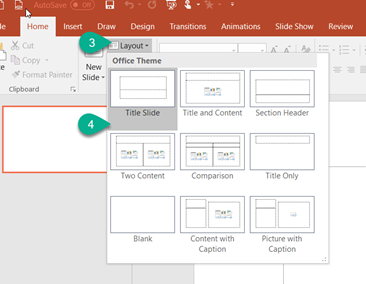 |
| What’s more, by selecting Home>Layout … |
| | You can quickly swap to any of the other layouts and your content will automatically adjust accordingly | |
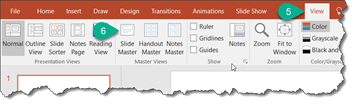 |
| From the VIEW Tab |
| | Selecting Slide Master allows you to modify or add to the various templates within your presentation | |
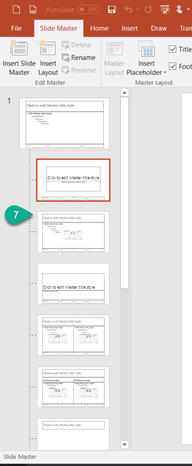 |
| Once the Slide Master is open, you can modify the basic designs of your slides changing fonts & colours, adding logos, etc so that they are applied consistently throughout your presentation to provide a “corporate” feel.
We will discuss Slide Masters in more detail in another post |
Was this post helpful?
Let us know if you liked the post. That’s the only way we can improve.