
One of my friends, Gordon, has written a book. It’s something that he’s been working on for a while & he asked my help with some of the formatting and editing. One thing that he wanted to include in the document was a Watermark behind the text to act as a Copyright Notice to allow him to send off copies of the book to potential publishers.
Rather than using one of the standard watermarks, he wanted a custom one to include a date and his name, so this is how we did it.
Inserting the watermark
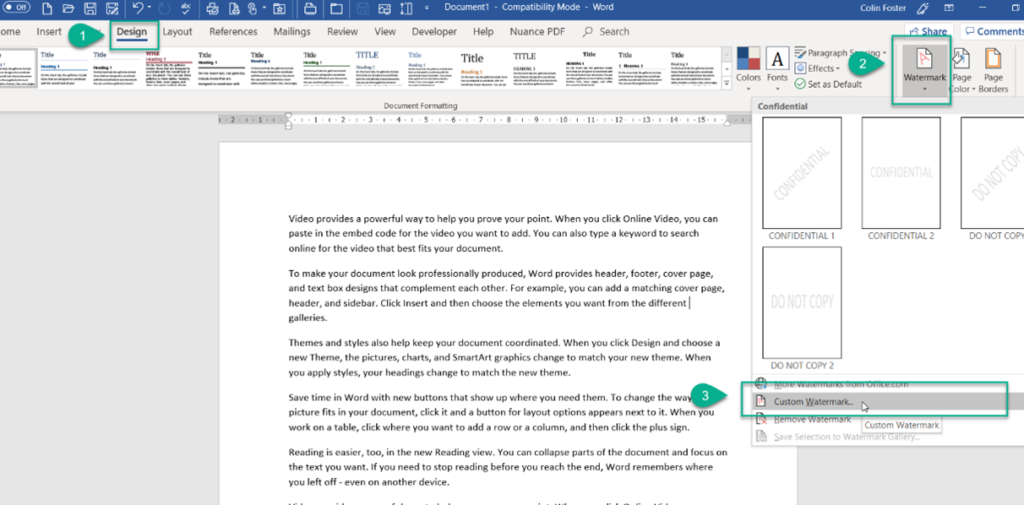
- From the design tab
- Select Watermark
- Select Custom watermark (if he’d wanted a standard watermark, we could have simply used one of the “Confidential” thumbnails that appear above the Custom Watermark)
We then need to choose how the watermark looks and what text we want to see…
Editing the watermark
- Select Text Watermark
- Click in the text box, highlighting the “ASAP”

- Type in the new text
- Choose whether a diagonal or horizontal watermark is needed
- Press OK

The finished document

The watermark is generated.
Was this post helpful?
Let us know if you liked the post. That’s the only way we can improve.